 FrontendHalt
Isolate a player core
The UI consumes a stable state and command API while HLS/DASH, MSE, native playback, DRM, and device quirks remain inside adapters.
FRONTEND SYSTEM DESIGN
Design the client for a video platform: adaptive playback, buffering resilience, and cross-device continuity.
THE INTERVIEW SEQUENCE
Clarify scope
Set requirements
Draw data flow
Defend trade-offs
Start with the smallest coherent design. After the main path works, introduce failure, scale, accessibility, observability, and release strategy one constraint at a time.
Video-on-demand first; live latency is a separate mode with different buffer targets.
10M daily viewers, 100k concurrent sessions at peak, with CDN delivery for every media byte.
Startup target below 2 seconds on typical broadband; rebuffer ratio below 1% of watch time.
Desktop, mobile, and TV controls share a player contract but may use different native playback capabilities.
The UI consumes a stable state and command API while HLS/DASH, MSE, native playback, DRM, and device quirks remain inside adapters.
Idle, loading, ready, playing, paused, seeking, stalled, ended, and fatal states prevent controls from guessing behavior from scattered events.
Manifest and segments have priority over recommendations, artwork, analytics, and prefetch so secondary UI cannot cause rebuffering.
Progress writes are coalesced and eventually consistent; playback never blocks on them, while a final lifecycle beacon improves resume accuracy.
Commands are intents; events are the authoritative playback facts emitted by the adapter.
type PlayerCommand = { type: 'play' | 'pause' } | { type: 'seek'; seconds: number };type PlayerEvent = | { type: 'ready'; duration: number } | { type: 'time'; current: number; buffered: number } | { type: 'quality'; bitrate: number } | { type: 'stalled' } | { type: 'fatal'; code: string };Impact: Playback drains its buffer and stalls.
Mitigation: Retry with jitter, switch CDN or rendition, preserve current time, and surface fatal UI only after bounded recovery.
Impact: Cross-device resume becomes stale.
Mitigation: Queue the latest checkpoint locally and retry without delaying playback.
Impact: The selected asset cannot start.
Mitigation: Capability-test before selecting a rendition and offer a compatible fallback or explicit error.
Impact: Controls and captions lag despite healthy media buffering.
Mitigation: Keep player events lightweight, defer adjacent UI, and measure interaction delay separately from media QoE.
Drive the discussion yourself first. This is one strong answer delivered the way you would say it in the room — a model, not the only correct design.
This answer goes wrong when you open with 'I'd use HLS'. Do it in order: pin down what kind of video and what 'good' means, draw a small number of boxes, then spend most of the time on the one genuinely hard part — keeping playback smooth when the network wobbles — and only then talk about failure and scale. Here is that walk, in the words you would actually use.
Step 1 · Clarify what you are building
Say: 'Before I design anything, a few questions. Is this video-on-demand, live, or both? Roughly how many concurrent viewers at peak? Which devices — just web, or also mobile and TV? And what is the bar for good: startup time, how often it is allowed to buffer?' Then state your assumptions so they can correct you: 'I will assume on-demand first, about 100,000 concurrent viewers at peak, web and mobile, startup under two seconds, buffering under one percent of watch time.' Two minutes here stops you designing the wrong thing.
Step 2 · Turn that into requirements
Split into what the user sees and what shapes the design underneath. User-facing: play, pause, seek, choose quality, pick captions and audio track, and resume where you left off on any device. Underneath: adaptive quality so it does not buffer, recover from a failed chunk without a hard error, and never let the recommendations rail or analytics slow the player. Write these where the interviewer can see them.
Step 3 · Draw the boxes, keep it small
Four boxes. One: a player core that wraps the messy parts — the streaming format like HLS or DASH, the browser Media Source API, DRM, device quirks — behind a clean 'commands in, events out' interface. Two: a thin UI shell (controls, overlays, recommendations) that only reacts to the player's state events and never touches the video element directly. Three: a CDN that serves every video byte. Four: a small watch-progress service the client checkpoints to periodically. Say why the core is isolated: 'so device and format complexity live in one place, and I can swap the playback engine without rewriting the controls.'
Step 4 · Deep-dive: adaptive bitrate, the actual hard part
Spend the most time here. 'The client fetches a manifest that lists the video at several quality levels, each cut into short segments. Before each segment, an algorithm on the client picks a quality from two signals: how fast recent downloads have been, and how much buffer is left. If the buffer is draining it steps down; if it is healthy and the network looks good it steps up — but conservatively, because viewers hate quality that flip-flops every few seconds more than they mind a slightly lower resolution.'
Step 5 · Failure: a segment does not load
'If a segment request fails I do not show an error straight away. I retry with a little random delay, and if it keeps failing I try a different CDN or drop to a lower quality that might arrive in time — all while keeping the current playback position. Only after a bounded number of failed recovery attempts do I show a real error. And progress writes never block playback: if that service is down I keep the latest position locally and retry later.'
Step 6 · Scale and the main-thread trap
'The scaling insight is that the video bytes go to the CDN, not my servers — my application servers only handle manifests, entitlement, metadata, and progress, which is a tiny fraction of the bytes. The other thing I watch is the main thread: if the UI does heavy work the controls and captions lag even when the video buffer is fine, so I keep the player's event handling lightweight and defer the recommendations and analytics.'
Step 7 · Name what you would measure
'I would track time to first frame, how often and how long it rebuffers, the fatal-error rate, and the number of quality switches — all split by device and network type, because a problem on slow mobile hides in an average. Every fatal error and recovery is logged; the routine time-update events are sampled.'
How to close
'To sum up: on-demand, web and mobile, 100k concurrent, two-second startup bar. The design is a player core that hides format and device complexity behind commands and events, a thin UI that only reacts to player state, a CDN for all media bytes, and an async progress service. The hard part is adaptive bitrate — pick quality per segment from throughput and buffer health, switch conservatively. Failures recover in the background and keep the position before ever showing an error. The first metric I would watch after launch is rebuffer ratio by network cohort.' Then stop and let them ask.
It contains device and protocol complexity behind one contract, lets UI state follow authoritative events, and permits adapter replacement without rewriting controls.
DESIGN CHECKLIST
Use this checklist to rehearse the case without reading the worked answer above.
Do not design yet. Use these questions to make hidden assumptions explicit and prevent solving the wrong problem.
Live streaming, video-on-demand, or both?
What device classes must be supported (TV, mobile, low-end Android, desktop)?
Is offline download/playback in scope?
What's the acceptable startup latency and rebuffering budget?
These are the user-visible capabilities the design must support. They define the first version's scope.
Play video with adaptive bitrate switching based on network conditions.
Resume playback position across sessions and devices.
Support captions/subtitles and multiple audio tracks.
Surface recommendations and search without blocking playback of the current video.
These qualities shape the architecture even though users do not click them directly: latency, resilience, accessibility, consistency, and scale.
Fast startup: first frame should render well under a few seconds on typical connections.
Resilience to network drops without a full player crash.
Consistent experience across a wide range of device performance tiers.
Now assign responsibilities to clear boundaries. Each part should have one reason to change and an explicit contract with the next part.
A player core wrapping HLS/DASH playback (via Media Source Extensions or a native player on constrained platforms), isolated behind a stable internal API from the rest of the UI.
A thin UI shell (controls, overlays, recommendations rail) that reacts to player state events rather than driving the player imperatively from many places.
A telemetry pipe that beacons startup time, rebuffer events, and bitrate switches for both product and reliability monitoring.
A watch-progress service synced periodically (and on pause/unload) so resume position is available across devices.
Trace one important user action from input to rendered result. This exposes ownership, race conditions, retries, and stale-data paths.
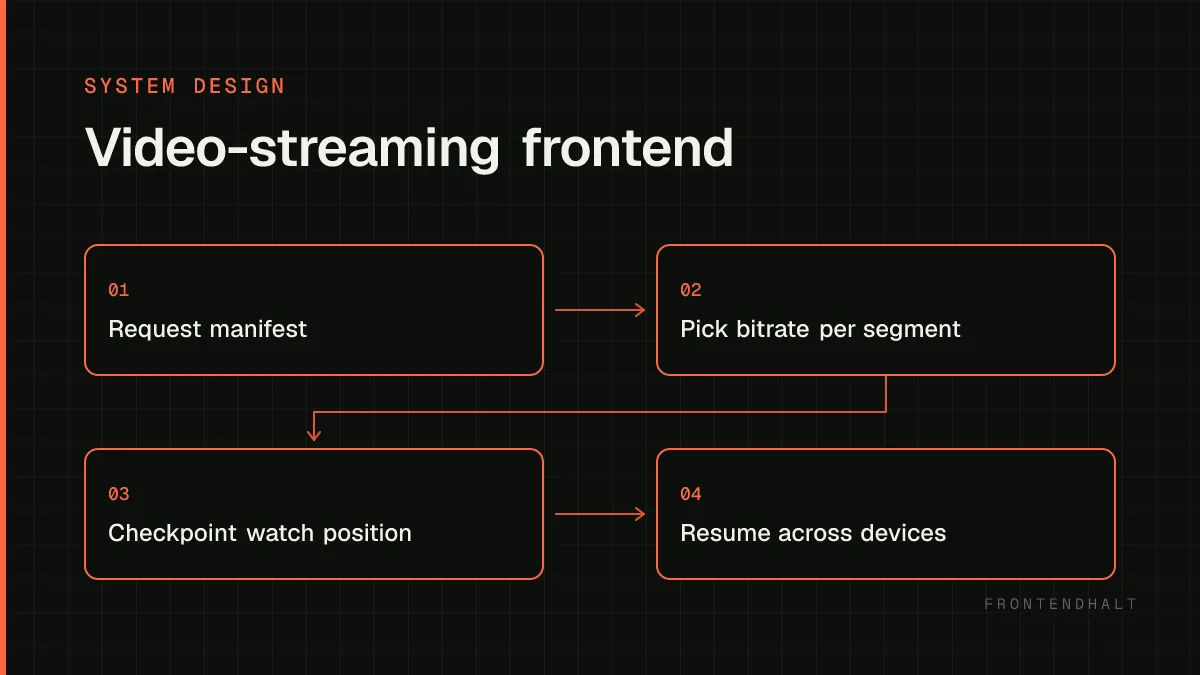
Client requests a manifest describing available quality renditions and segment URLs.
An adaptive bitrate algorithm on the client picks a rendition per segment based on measured throughput and buffer health.
Playback position is checkpointed to a backend service on an interval and on key lifecycle events (pause, backgrounding, unload).
On load, the client fetches last known position from that service to offer 'resume where you left off.'
There is no perfect architecture. State what each choice optimizes, what it costs, and the signal that would make you revisit it.
Aggressive upfront buffering reduces mid-playback rebuffering but increases startup latency and wasted bandwidth if the user abandons quickly.
Client-driven ABR is simpler to ship but reacts slower to sudden network changes than a server-assisted approach; the complexity cost has to be justified by measured rebuffer rates.
Preloading recommendations/thumbnails improves perceived next-video speed but competes with the current video for bandwidth on constrained connections.
Scale the measured bottleneck rather than every box. Frontend scaling includes payload size, main-thread time, rendering work, cacheability, and release safety.
Push segment delivery to a CDN; the app server never serves video bytes directly.
Keep the watch-progress write path cheap and eventually consistent — losing a few seconds of resume accuracy is acceptable, blocking playback on it is not.
Feature-flag new player behavior (new ABR heuristic, new codec) and roll out gradually while watching rebuffer/error telemetry.
Interviewers often probe these failure modes. Name them before being prompted and explain the guardrail you would add.
Treating the player as a black box with no exposed state, forcing the UI to guess playback state from timers instead of real events.
Blocking the play button on non-essential requests (analytics, recommendations) that have nothing to do with starting playback.
Not distinguishing a genuine network failure from a temporary rebuffer, leading to premature error UI during normal adaptive behavior.
Your closing summary
Restate the critical user flow, the most important quality target, the architecture boundary that protects it, and the trade-off you accepted. Then name the first metric you would watch after launch.
Back to all cases →