 FrontendHalt
Split browse from transact
Catalog pages use CDN caching and progressive enhancement; cart, inventory reservation, and checkout use authenticated service boundaries.
FRONTEND SYSTEM DESIGN
Design the storefront: catalog browsing, cart, and checkout, optimized for conversion and resilience.
THE INTERVIEW SEQUENCE
Clarify scope
Set requirements
Draw data flow
Defend trade-offs
Start with the smallest coherent design. After the main path works, introduce failure, scale, accessibility, observability, and release strategy one constraint at a time.
Millions of products, global read traffic, and sale-event spikes 20 times baseline.
Product pages prioritize cacheability and SEO; cart and checkout require authenticated consistency.
Listing inventory may be briefly stale, but price and stock are authoritative at checkout.
Payment details are tokenized by a compliant provider and never traverse general frontend logs.
Catalog pages use CDN caching and progressive enhancement; cart, inventory reservation, and checkout use authenticated service boundaries.
HTML exposes products quickly and discovers critical media while client code hydrates only interactive regions.
Optimistic local commands improve speed, but responses return canonical price, availability, promotions, and version.
One user intention carries one idempotency key across retries, preventing duplicate orders or charges.
Version and mutation id support optimistic reconciliation and conflict detection.
type CartCommand = { mutationId: string; cartVersion: number; type: 'setQuantity'; productId: string; quantity: number; };type CartResponse = { cartVersion: number; lines: CartLine[]; totals: Money; warnings: { productId: string; message: string }[]; };Impact: Displayed quantity or price is wrong.
Mitigation: Reconcile canonical cart, explain the adjustment, and preserve focus and user context.
Impact: Blind retry can duplicate an order.
Mitigation: Retry with the same idempotency key and query order status before offering another attempt.
Impact: Listing shows old price or stock.
Mitigation: Use bounded revalidation and label checkout as authoritative; invalidate critical price changes.
Impact: User cannot complete purchase.
Mitigation: Preserve non-sensitive checkout state, show recoverable status, and avoid creating a pending order without a clear state machine.
Drive the discussion yourself first. This is one strong answer delivered the way you would say it in the room — a model, not the only correct design.
A storefront answer should be organized by the shopper's journey — browse, cart, checkout — because each stage has a different rule. Browsing is public and cacheable; the cart is fast and forgiving; checkout is about money and must be exactly right. Keep saying which stage you are in and what that stage's constraint is.
Step 1 · Clarify
Ask: 'How big is the catalog? Do we need SEO on product pages? Guest checkout or accounts? One payment provider or several? And roughly what traffic, especially at sale peaks?' Assumptions: 'Large catalog, SEO matters, guest checkout allowed, one payment provider to start, and traffic that spikes hard during promotions.' The SEO and peak answers drive the rendering and caching decisions.
Step 2 · Requirements by stage
Browse: fast first paint and good SEO on listing and product pages. Cart: add, remove, change quantity, and have it feel instant and survive a refresh. Checkout: collect address and payment, never double-charge, and confirm only when the order is really placed. Say the constraint per stage out loud: 'browse is cacheable and public, cart is optimistic and reversible, checkout is authoritative and idempotent.'
Step 3 · Rendering and the browse boxes
'Listing and product pages are server-rendered or statically generated and revalidated, so the first paint is fast and crawlers see real content, then they hydrate into an interactive client. Behind that sits a catalog and search service that can be cached hard at the CDN and scaled separately from anything to do with checkout.'
Step 4 · The cart
'The client treats the cart as the source of truth for display and does optimistic updates — add to cart shows immediately — while firing a request to persist it server-side. If that request fails, the optimistic change reverts and an error shows. The cart is reversible, so being wrong for a second is fine.'
Step 5 · Checkout: the part that must be exactly right
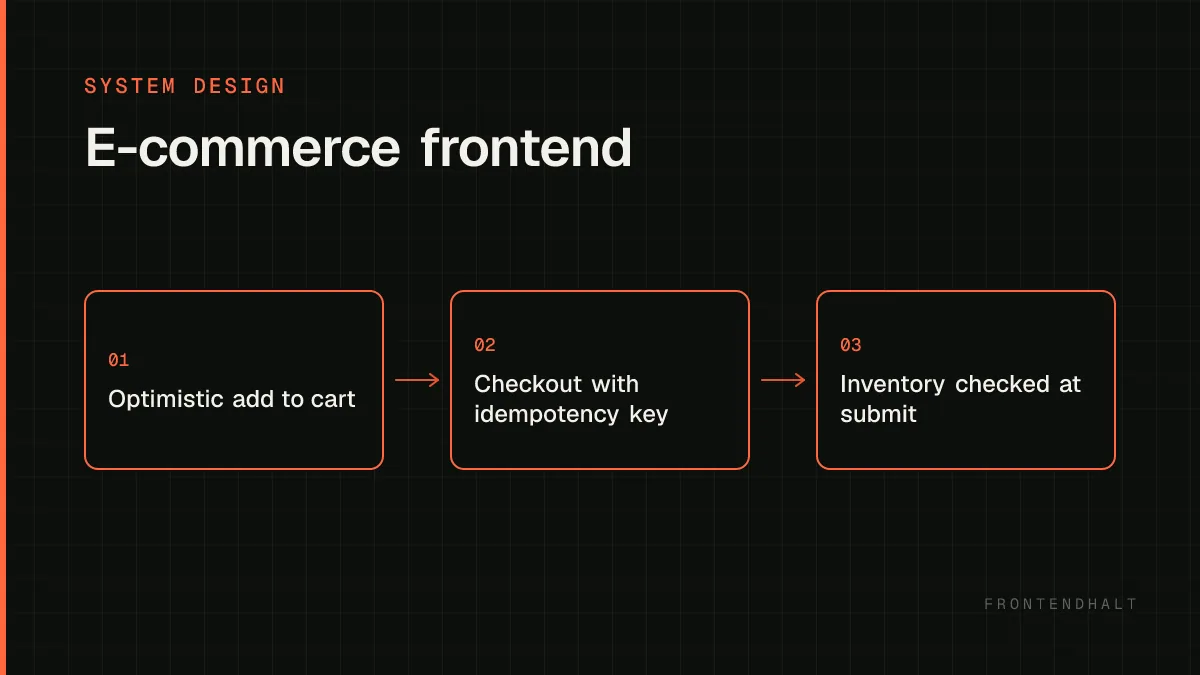
'Checkout is a guarded multi-step flow — editing, validating, authorizing payment, confirming — backed by idempotent server endpoints. The order request carries an idempotency key generated once per attempt, so a network retry cannot create two orders. Inventory is checked authoritatively at submission time regardless of what the product page showed, because that display might be minutes stale. And I never show order confirmed optimistically — that waits for the server.'
Step 6 · Payment and data safety
'Card fields are hosted by the payment provider or tokenized, so raw card data never touches my servers or my analytics. Cart and order access is authorized server-side; a guessable order id is not permission.'
Step 7 · Scale and what to measure
'The catalog and media path scales independently at the CDN and absorbs the promotion spike; the checkout path is lower volume and stays private. After launch I would watch conversion alongside the technical causes — Core Web Vitals on product pages, API error rates, payment decline categories, and how often the idempotency guard actually fires.'
How to close
'So: three stages with three rules. Browse is server-rendered and CDN-cached for speed and SEO. The cart is client-authoritative with optimistic updates reconciled against the server. Checkout is a guarded state machine on idempotent endpoints with an idempotency key per attempt, authoritative inventory checks at submission, and no optimistic success. Payment fields are provider-hosted. First metric after launch: checkout completion rate broken down by the technical failure that caused each drop-off.'
Catalog HTML, product media, and public product APIs at the CDN; personalized cart and checkout require private, deliberate caching.
DESIGN CHECKLIST
Use this checklist to rehearse the case without reading the worked answer above.
Do not design yet. Use these questions to make hidden assumptions explicit and prevent solving the wrong problem.
What's the expected traffic pattern — steady, or spiky around sales events?
Is inventory strictly real-time, or can the UI tolerate brief staleness?
Single region or globally distributed customers?
Guest checkout supported, or account required?
These are the user-visible capabilities the design must support. They define the first version's scope.
Browse and search a product catalog with filtering and pagination.
Maintain a cart that persists across sessions and devices for logged-in users.
Complete checkout: address, payment, order confirmation.
Reflect stock/availability accurately enough to avoid overselling at checkout.
These qualities shape the architecture even though users do not click them directly: latency, resilience, accessibility, consistency, and scale.
Fast first paint on product listing and detail pages — this directly affects conversion.
Checkout must be resilient: a flaky network shouldn't silently drop a submitted order or double-charge.
Consistent cart state across tabs and devices.
Now assign responsibilities to clear boundaries. Each part should have one reason to change and an explicit contract with the next part.
Server-rendered (or statically generated + revalidated) product listing/detail pages for fast first paint and SEO, hydrating into an interactive client afterward.
A cart service the client treats as the source of truth, with local optimistic updates for perceived speed reconciled against server responses.
A checkout flow as a guarded multi-step client experience backed by idempotent server endpoints (see the idempotency-key pattern) to survive retries safely.
A search/catalog service behind the frontend that can be scaled and cached independently of the checkout/payment path.
Trace one important user action from input to rendered result. This exposes ownership, race conditions, retries, and stale-data paths.
Adding an item to cart updates local state immediately and fires a request to persist it server-side; a failure reverts the optimistic change and surfaces an error.
At checkout, the client submits an order request tagged with an idempotency key so a network retry can't create a duplicate order.
Inventory is checked authoritatively at order submission time regardless of what the listing page displayed, since that display may be stale.
There is no perfect architecture. State what each choice optimizes, what it costs, and the signal that would make you revisit it.
Fully real-time inventory sync everywhere is expensive; showing 'likely in stock' on listings and confirming authoritatively only at checkout is usually the better tradeoff.
Optimistic cart updates feel faster but require careful reconciliation and rollback UI for the failure path — silent failure would be worse than a slightly slower confirmed update.
Static/SSG product pages maximize speed and cacheability but need a revalidation strategy so price/stock changes don't go stale for too long.
Scale the measured bottleneck rather than every box. Frontend scaling includes payload size, main-thread time, rendering work, cacheability, and release safety.
Cache product listing/detail pages aggressively at the CDN layer; invalidate or revalidate on content change rather than serving them dynamically per request.
Isolate checkout/payment infrastructure from the catalog/browse path so a traffic spike on browsing (e.g. a sale) can't degrade the ability to complete purchases already in progress.
Rate-limit and queue checkout submissions gracefully during extreme spikes rather than failing requests outright.
Interviewers often probe these failure modes. Name them before being prompted and explain the guardrail you would add.
Trusting client-side displayed stock/price at order time instead of re-validating server-side.
Not using an idempotency key on order submission, allowing a retried request to double-charge or double-order.
Losing cart contents on a session/device switch because cart state only lived in local storage, not a synced server-side cart.
Your closing summary
Restate the critical user flow, the most important quality target, the architecture boundary that protects it, and the trade-off you accepted. Then name the first metric you would watch after launch.
Back to all cases →